
Products · Electronic Key Cabinets
Physical keys. Released only to authorised users.
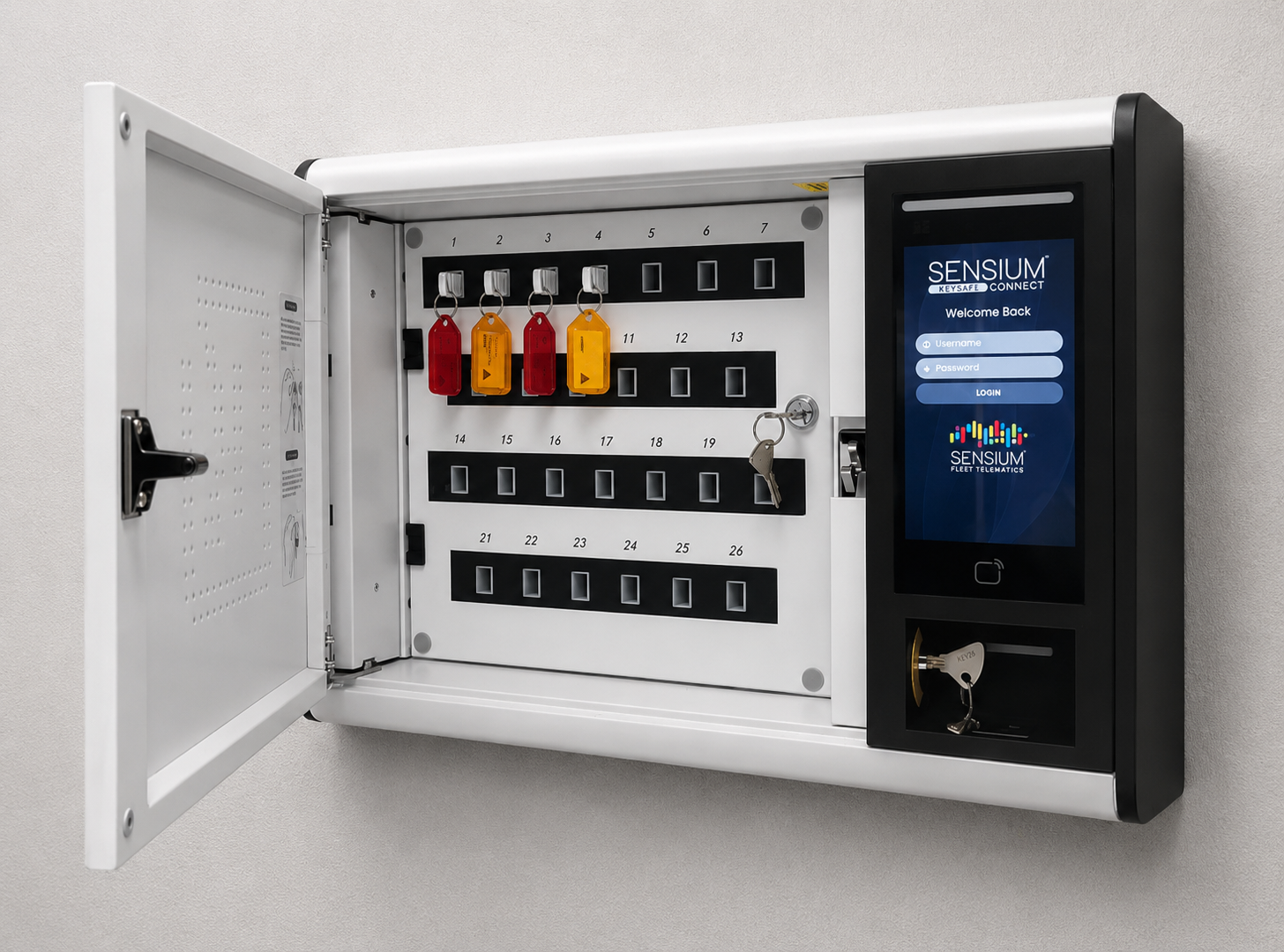
Sensium Electronic Key Cabinets store vehicle keys, fobs, and transit passes — releasing them only to staff with a valid pool vehicle booking. Governed by the same policies, permissions, and audit trail as the rest of Sensium Connect+. Existing vehicle locks stay exactly as they are.
30 minutes, scoped to key management at your depots.

The bridge between booking and key
Pool booking systems make digital reservations easy. The hard part has always been the physical key — who released it, when, to whom, and whether the person was actually allowed to. Sensium Electronic Key Cabinets enforce the booking at the key drawer itself, so the physical layer matches the digital one exactly. Audit-grade. No bypass.
Why fleet managers install the cabinet
Four operational outcomes.
The Electronic Key Cabinet solves a specific problem the rest of the fleet stack doesn't: making the physical key match the digital booking. Used in council depots, government fleet bays, shared corporate carparks, and any environment where your staff share access to multiple vehicles.

The problem
The hard part has always been the physical key.
Booking-governed release
Right key. Right person. Right booking window.
When a staff member books a vehicle in Sensium Connect+, the cabinet knows. It releases only the key for the booked vehicle, only to the staff member named on the booking, and only during the booking window. Outside those parameters, the key stays locked. Manual overrides do not exist — the booking system is the only path.
Release conditions
- Valid Sensium Connect+ booking
- Authenticated staff member (RFID, PIN, or app)
- Inside the booking window
- Correct key for the booked vehicle
- Driver authorised for the fleet
Logged per event
- Staff member identity
- Booking reference
- Key identifier and slot
- Release and return timestamps
- Exceptions and unauthorised attempts
Audit trail
Every release. Every return. Procurement-grade.
Each cabinet event is logged into Sensium Connect+ — which key was released, to whom, against which booking, at what time, and when it came back. Returns are reconciled automatically. For councils, government, and enterprise fleets where physical-key custody has to be evidenced, the cabinet replaces a clipboard, an Excel sheet, or a missing trail with a record that withstands procurement and audit scrutiny.
Keys, fobs, passes — anything physical
It is not only car keys.
Each cabinet slot is independently controlled. The Electronic Key Cabinet stores vehicle keys for any make and model, smart fobs, proximity keys, transit passes, bus access cards, depot keys, and any other small physical credential that gets shared across staff. Some customers run the cabinet for office and depot access management as well as fleet keys — one unit, one policy framework, one audit log.
What goes in the slots
Vehicle keys
Any make, any model — no vehicle modification
Smart fobs and proximity keys
Keyless-entry credentials handled the same way
Transit passes and access cards
Bus passes, depot access, building keys
Deployment realities
The cabinet is the path to booking-governed access on mixed-age fleets, leased vehicles, and any unit where keyless retrofit isn't economic. It coexists with Sensium TRACKbox + keyless modules on the rest of the fleet — both report into the same Connect+ booking system.
No vehicle modification
Existing vehicle locks. Untouched.
The Electronic Key Cabinet doesn't change the vehicle. The existing locking system, the existing key, the existing immobiliser — all stay exactly as they are. The cabinet only changes how the keys to those locks are accessed and audited. This makes it the right product for fleets that want booking-governed access today, on every vehicle, without retrofitting telematics or keyless modules to each unit first.
Match the physical key to the digital booking at your depot - 30 minutes.
Pairs with
Pool Vehicle Booking is the natural pairing.
The cabinet is the physical-layer counterpart to Sensium's Pool Vehicle Booking. Most customers deploy them together — but the cabinet works against any booking-driven workflow inside Sensium Connect+.
Software
Pool Vehicle Booking
The booking system that drives everything. Fair, compliant, AI-driven allocation across departments and cost centres.
Hardware (vehicle-side)
Driver ID + RFID keyless
On vehicles where keyless retrofit is economic. RFID staff card unlocks the vehicle and starts the booking — no physical key released.
Frequently asked
Electronic Key Cabinet questions.
Question 01
What is an Electronic Key Cabinet?
Question 01
What is an Electronic Key Cabinet?
A Sensium Electronic Key Cabinet is a wall-mounted secure storage unit for physical vehicle keys, access fobs, and transit or bus passes. Keys are individually tagged and locked into the cabinet. A staff member with a valid pool vehicle booking can release the correct key for their booking window via RFID, PIN, or app — and only that key. Returns are logged the same way. The cabinet enforces the booking policy at the physical-key layer, not just the digital one.
Question 02
Why do I need a key cabinet if Sensium has keyless RFID entry?
Question 02
Why do I need a key cabinet if Sensium has keyless RFID entry?
RFID keyless entry works brilliantly for vehicles where Sensium TRACKbox + the optional keyless module are installed. But a typical fleet also contains vehicles where keyless retrofit isn't economic (leased units, older vehicles, vehicles about to be replaced), plus mobile assets that use physical keys, fobs, or transit passes. The Electronic Key Cabinet handles every one of those without changing the vehicle. Most customers run both — keyless for the main pool fleet, key cabinet for everything else.
Question 03
Who can release a key from the cabinet?
Question 03
Who can release a key from the cabinet?
Only the staff member assigned to the relevant booking, during the booking window, and only for the specific key allocated to that booking. Access is governed by the same role-based permissions, booking policies, and audit controls that apply across Sensium Connect+ — so there's no separate identity system or policy framework to manage.
Question 04
What happens if someone tries to take a key outside their booking?
Question 04
What happens if someone tries to take a key outside their booking?
The cabinet simply does not release the key. Attempts can be flagged as alerts to fleet managers if required. There is no physical override that bypasses the booking system — the only way to release a key is through a valid booking.
Question 05
Can the cabinet store things other than vehicle keys?
Question 05
Can the cabinet store things other than vehicle keys?
Yes. Smart fobs, proximity keys, transit passes, bus access cards, depot keys, and any other small physical credential that gets shared across staff. Each slot is independently controlled. Some customers use the cabinet for office and depot access management as well as fleet keys.
Question 06
Does the cabinet replace our existing vehicle locks?
Question 06
Does the cabinet replace our existing vehicle locks?
No. The vehicle's existing locking system stays exactly as it is. The cabinet only changes how the keys to those locks are accessed and audited. This means there is no vehicle modification involved — installing or removing a cabinet is purely a facility-side decision and doesn't affect the vehicle itself.
Question 07
Is there an audit log?
Question 07
Is there an audit log?
Yes — every release and return is logged with the staff member, booking reference, key identifier, and timestamp. The audit trail satisfies procurement-grade requirements and integrates with the rest of the Sensium Connect+ activity log. For councils, government, and enterprise customers running compliance-bound fleet operations, the cabinet is often the only practical way to evidence physical-key custody.
Question 08
Does the cabinet need TRACKbox?
Question 08
Does the cabinet need TRACKbox?
No. The Electronic Key Cabinet can run independently of TRACKbox — it talks directly to Sensium Connect+. It's particularly useful as the bridge product for fleets that haven't yet fitted TRACKbox to every vehicle, but want booking-governed key management today.
Question 09
How does a staff member authenticate at the cabinet?
Question 09
How does a staff member authenticate at the cabinet?
A staff member identifies themselves at the cabinet by RFID, PIN, or app, and the cabinet checks that against the booking system before releasing a key. It only releases the correct key for that person's current booking — the same role-based permissions and booking policies that govern the rest of Sensium Connect+ apply at the cabinet.
Question 10
Where is the key cabinet activity data stored?
Question 10
Where is the key cabinet activity data stored?
Every release and return reconciles into the same Sensium Connect+ activity log as the rest of the platform. Sensium Connect+ is hosted on Google Cloud Australian infrastructure, with all customer data - Australian and New Zealand - on Australian servers, encrypted in transit and at rest — so the physical-key audit trail carries the same data residency and retention as your fleet data.
Talk to Sensium
Match the physical key to the digital booking.
A 30-minute walkthrough on your depot layout, fleet mix, and what physical credentials staff need to share. We will scope cabinet size, slot configuration, and how it slots into your existing Sensium Connect+ (or where to start if you don't have Connect+ yet).